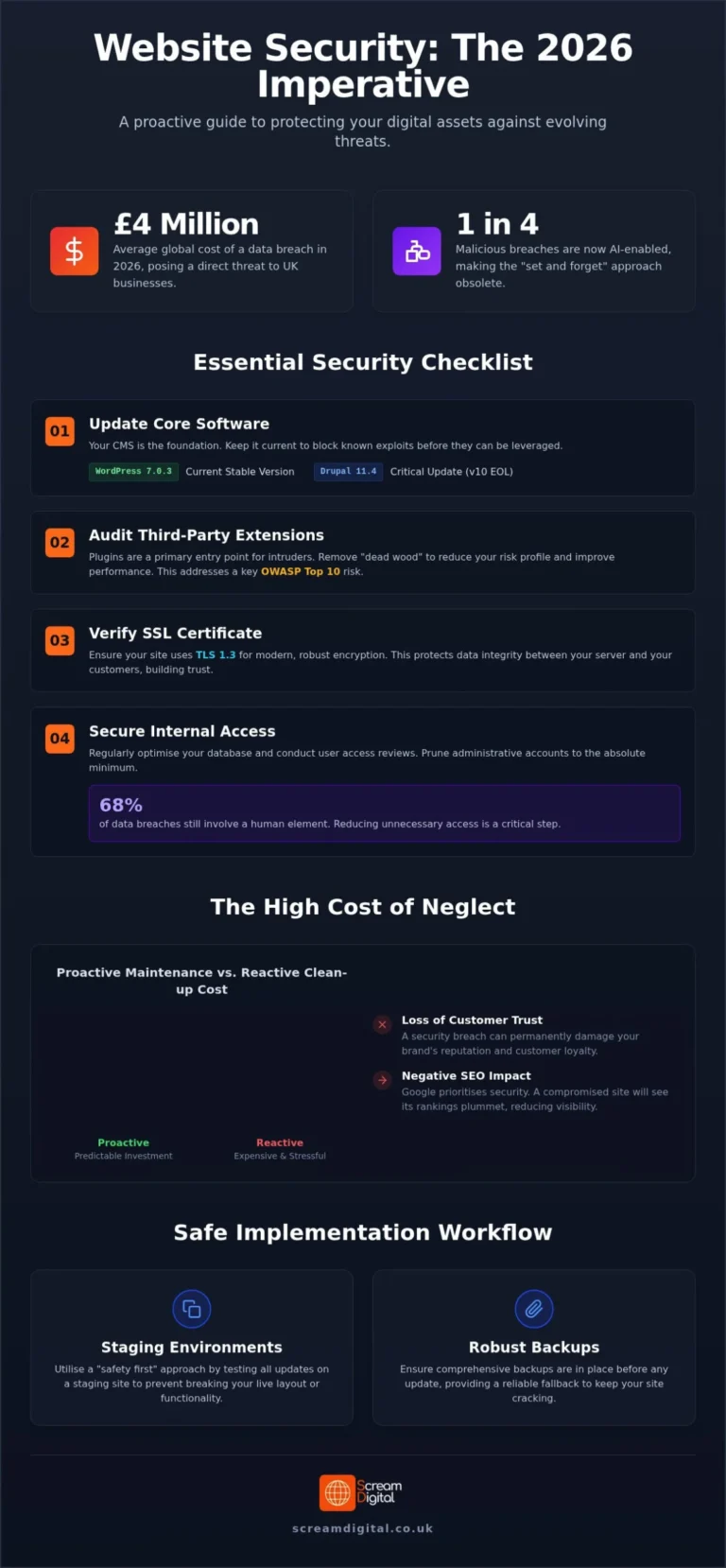
The Complete UK Business Guide
A website is no longer a digital luxury—it’s a business essential. Whether you’re a small local café in Bristol, a law firm in Manchester, or an e-commerce retailer in London, your website is often the first impression customers have of your brand. Yet, many UK businesses treat their websites as “set and forget” assets—built once, then left untouched for months or even years.
The truth is, websites require regular maintenance just like any other business asset. Neglecting maintenance can lead to slow performance, broken features, security vulnerabilities, and lost revenue.
This comprehensive guide explains how often you should maintain your website, what tasks to perform daily, weekly, monthly, quarterly, and annually, and how to create a sustainable maintenance plan that protects your investment and supports long-term growth.
1. Why Website Maintenance Matters
1.1 The Cost of Neglect
A neglected website is like a shop with a broken door, flickering lights, and outdated signage. Customers might still find it—but they won’t stay long.
Common consequences of poor maintenance:
- Security breaches: Outdated plugins and software are the number one cause of website hacks.
- Downtime: Unmonitored hosting or expired SSL certificates can take your site offline without warning.
- Slow performance: Unoptimised images, bloated databases, and outdated code slow down load times.
- SEO decline: Google penalises slow, insecure, or broken websites.
- Lost trust: Visitors lose confidence when they see broken links, outdated content, or “Not Secure” warnings.
Real-world example:
A small estate agency in Leeds ignored plugin updates for over a year. Their WordPress site was hacked, redirecting visitors to a spam site. It took £1,200 and two weeks to restore the site—and they lost 40% of their organic traffic permanently.
1.2 The Benefits of Regular Maintenance
Regular maintenance keeps your website secure, fast, and effective.
Key benefits:
- Improved security: Regular updates patch vulnerabilities before hackers exploit them.
- Better performance: Optimised databases and images keep load times under 3 seconds.
- Higher search rankings: Google rewards fast, secure, regularly updated websites.
- Enhanced user experience: Visitors stay longer and convert more often.
- Lower long-term costs: Preventative maintenance is cheaper than emergency repairs.
Think of it like a car:
You wouldn’t drive 50,000 miles without an oil change. Your website needs the same care to keep running smoothly.
2. Daily Website Maintenance Tasks
Daily maintenance ensures your website is secure, functional, and available to visitors at all times.
2.1 Security Monitoring
- Use a security plugin such as Wordfence, Sucuri, or iThemes Security.
- Enable real-time alerts for suspicious activity (failed logins, file changes, malware).
- Check for unauthorised admin accounts or unusual traffic spikes.
- Review firewall logs daily if you handle sensitive data (e.g. e-commerce, legal, healthcare).
Tip:
Set up email or SMS alerts for critical security events so you can respond immediately.
2.2 Backup Verification
- Ensure daily automatic backups are running correctly.
- Store backups in multiple locations (server + cloud storage such as Google Drive or Dropbox).
- Test restoring a backup once a month to confirm it works.
Recommended tools:
- UpdraftPlus (WordPress)
- JetBackup (cPanel hosting)
- ManageWP (multi-site management)
2.3 Uptime Monitoring
- Use uptime monitoring tools to check your site every 5 minutes.
- Receive instant alerts if your site goes down.
- Investigate causes of downtime (server overload, expired domain, DNS issues).
Tools:
- UptimeRobot (free for 5-minute checks)
- Pingdom (advanced analytics)
- Better Uptime (incident management)
2.4 Form Testing
- Test all contact, booking, and enquiry forms daily.
- Ensure submissions are received and confirmation emails are sent.
- Check spam filters aren’t blocking legitimate messages.
Real example:
A Bristol-based plumbing company discovered their contact form had stopped working for three weeks after a plugin update. They lost 27 potential job enquiries—worth over £3,000 in revenue.
3. Weekly Website Maintenance Tasks
Weekly tasks focus on keeping your content fresh, your software updated, and your analytics accurate.
3.1 Content Updates
- Add new blog posts, news, or case studies.
- Update service pages with new offers or pricing.
- Refresh homepage banners or seasonal promotions.
- Check for outdated information (e.g. old events, expired offers).
Why it matters:
Fresh content signals to Google that your site is active and relevant, improving SEO rankings.
3.2 Comment Moderation
- Review and approve genuine comments.
- Delete spam or inappropriate content.
- Respond to customer questions promptly.
Tip:
Enable Akismet or Antispam Bee to automatically filter spam comments.
3.3 Analytics Review
- Check Google Analytics and Search Console weekly.
- Identify traffic trends, top-performing pages, and bounce rates.
- Investigate sudden drops in traffic or conversions.
Metrics to monitor:
- Sessions and users
- Average session duration
- Conversion rate
- Top landing pages
- 404 errors
3.4 Broken Link Checks
- Use tools like Broken Link Checker or Ahrefs to find dead links.
- Fix or redirect broken URLs to maintain SEO value.
Why it matters:
Broken links frustrate users and harm your search rankings.
3.5 Plugin and Theme Updates
- Update WordPress plugins, themes, and core files weekly.
- Always back up before updating.
- Test updates on a staging site if possible.
Tip:
Outdated plugins are responsible for 90% of WordPress hacks. Never ignore update notifications.
4. Monthly Website Maintenance Tasks
Monthly maintenance involves deeper optimisation, performance checks, and strategic improvements.
4.1 Comprehensive Security Scan
- Run a full malware and vulnerability scan.
- Check file integrity and permissions.
- Review user accounts and remove inactive users.
- Update passwords for admin and FTP accounts.
Tools:
- Sucuri SiteCheck
- Wordfence Premium
- MalCare
4.2 Performance Optimisation
- Test site speed using GTmetrix or Google PageSpeed Insights.
- Compress large images and enable lazy loading.
- Minify CSS, JavaScript, and HTML.
- Review hosting performance—consider upgrading if load times exceed 3 seconds.
Target metrics:
- Load time: under 3 seconds
- Page size: under 2MB
- Requests: under 100
4.3 SEO Audit
- Review keyword rankings and organic traffic.
- Check meta titles, descriptions, and alt text.
- Identify duplicate or thin content.
- Fix crawl errors in Google Search Console.
- Update internal links to improve navigation.
Tools:
- Screaming Frog SEO Spider
- Ahrefs
- SEMrush
4.4 Content Refresh
- Update older blog posts with new data or examples.
- Add internal links to newer content.
- Replace outdated images or statistics.
- Re-promote refreshed content on social media.
4.5 Database Optimisation
- Clean up post revisions, spam comments, and transient data.
- Optimise database tables using WP-Optimize or phpMyAdmin.
- Schedule automatic clean-ups monthly.
4.6 User Experience Testing
- Test your website on desktop, tablet, and mobile.
- Check navigation, forms, and checkout processes.
- Ask a colleague or customer to test usability.
Goal:
Ensure every visitor can find what they need quickly and easily.
5. Quarterly Website Maintenance Tasks
Quarterly maintenance focuses on strategic improvements and deeper analysis.
5.1 Major Updates
- Apply major CMS or framework updates (e.g. WordPress 6.x).
- Test compatibility with plugins and themes.
- Review custom code for deprecated functions.
5.2 Design Refresh
- Update hero images, banners, and featured content.
- Review typography and colour contrast for accessibility.
- Ensure branding remains consistent across all pages.
Example:
A London-based marketing agency refreshes its homepage design every quarter to highlight new campaigns and maintain a modern look.
5.3 Competitor Analysis
- Review competitor websites for new features or content strategies.
- Identify gaps in your own offering.
- Benchmark SEO performance using Ahrefs or SEMrush.
5.4 Conversion Optimisation
- Review call-to-action buttons, forms, and landing pages.
- A/B test different headlines or layouts.
- Analyse conversion funnels in Google Analytics.
Goal:
Increase enquiries, sales, or sign-ups without increasing traffic.
5.5 Accessibility Audit
- Test compliance with WCAG 2.1 AA standards.
- Use tools like WAVE or axe DevTools.
- Ensure text contrast, keyboard navigation, and alt text are correct.
Why it matters:
Accessibility isn’t just ethical—it’s a legal requirement under the Equality Act 2010.
6. Annual Website Maintenance Tasks
Annual maintenance is your opportunity to step back and evaluate your website’s overall performance and direction.
6.1 Hosting Review
- Assess your hosting provider’s reliability, speed, and support.
- Compare uptime guarantees and renewal costs.
- Consider upgrading to managed hosting if you’re on shared plans.
UK hosting providers to consider:
- Krystal Hosting (UK-based, eco-friendly)
- 20i (fast, scalable)
- SiteGround UK (excellent support)
6.2 Complete Redesign Consideration
- If your website is over 3 years old, consider a redesign.
- Evaluate whether your design still reflects your brand and user expectations.
- Review analytics to identify underperforming pages.
Average UK redesign cost:
- Small business site: £2,000–£5,000
- E-commerce site: £5,000–£15,000
- Corporate site: £10,000–£30,000
6.3 Strategy Overhaul
- Review your digital marketing strategy.
- Align website goals with business objectives.
- Update your content plan, SEO targets, and conversion goals.
6.4 Technology Stack Review
- Check if your CMS, plugins, or integrations are still fit for purpose.
- Consider adopting new technologies (headless CMS, progressive web apps).
- Review third-party integrations (CRM, email marketing, payment gateways).
Example:
A Manchester-based retailer migrated from WooCommerce to Shopify Plus for scalability, reducing maintenance time by 40% and increasing sales by 25%.
7. Emergency Maintenance
Even with the best planning, emergencies happen. Knowing how to respond quickly can save your business time, money, and reputation.
7.1 When Things Break
- If your site goes down, check your hosting provider’s status page.
- Use DownDetector or UptimeRobot to confirm downtime.
- Contact your host’s support team immediately.
- Restore from the most recent backup if necessary.
7.2 Security Breaches
- Take the site offline temporarily to prevent further damage.
- Scan for malware using Sucuri or Wordfence.
- Change all passwords (admin, FTP, database).
- Restore from a clean backup.
- Notify affected users if data was compromised (required under UK GDPR).
7.3 Downtime Response
- Display a temporary maintenance page with contact details.
- Communicate transparently on social media.
- Investigate root causes and document the incident.
Tip:
Create an emergency response plan with clear roles and contact details for your team and hosting provider.
8. Website Maintenance Costs
8.1 DIY vs Professional Maintenance
DIY Maintenance:
- Suitable for small, low-traffic websites.
- Requires technical knowledge and time commitment.
- Risk of errors if updates or backups are mishandled.
Professional Maintenance:
- Ideal for business-critical or e-commerce sites.
- Includes proactive monitoring, updates, and support.
- Saves time and reduces risk of costly downtime.
8.2 Typical UK Maintenance Pricing
|
Service Type |
DIY Cost (per month) |
Professional Cost (per month) |
|---|---|---|
|
Basic brochure site |
£0–£30 |
£50–£150 |
|
Small e-commerce site |
£20–£50 |
£100–£300 |
|
Medium business site |
£30–£60 |
£200–£500 |
|
Large corporate site |
£50–£100 |
£500–£1,000+ |
Annual cost range: £600–£6,000 depending on complexity and support level.
8.3 The ROI of Maintenance
Preventative maintenance saves money long-term.
Example:
A London-based solicitor’s firm pays £150/month for professional maintenance.
In 2025, their site was attacked but restored within 30 minutes using a backup.
Estimated savings: £3,000 in lost leads and £1,200 in emergency repair costs.
9. Tools and Resources
9.1 WordPress Maintenance Plugins
- UpdraftPlus: Automated backups
- Wordfence: Security and firewall
- WP Rocket: Performance optimisation
- WP-Optimize: Database cleaning
- ManageWP: Centralised management for multiple sites
9.2 Monitoring Tools
- UptimeRobot: Free uptime monitoring
- Pingdom: Advanced performance tracking
- Google Search Console: SEO and indexing insights
- Google Analytics 4: Traffic and conversion tracking
9.3 UK-Specific Services
- Krystal Hosting: UK-based managed hosting
- WP Tech Support: UK WordPress maintenance plans
- WPMaintain: London-based WordPress support
- SiteGround UK: Managed hosting with daily backups
10. Real UK Case Studies
10.1 Case Study 1: The Neglected Website
Business: Independent café in Brighton
Issue: Website left untouched for 18 months
Outcome:
- Outdated menu and opening hours
- Broken contact form
- Site hacked via outdated plugin
- £800 repair cost + 3 days downtime
- Lost 20% of online bookings
10.2 Case Study 2: The Maintained Website
Business: Solicitors’ firm in Bristol
Maintenance Plan: £120/month professional service
Outcome:
- 99.98% uptime
- Weekly backups and updates
- Quarterly SEO audits
- 35% increase in organic traffic
- 22% more online enquiries
10.3 Case Study 3: The E-commerce Example
Business: Online clothing retailer in Manchester
Maintenance Plan: In-house developer + managed hosting (£400/month)
Outcome:
- Site speed improved from 5.2s to 1.8s
- Zero downtime during Black Friday
- 18% increase in conversion rate
- £60,000 additional annual revenue
11. Creating Your Maintenance Schedule
11.1 Step-by-Step Template
|
Frequency |
Tasks |
|---|---|
|
Daily |
Security monitoring, backup verification, uptime checks, form testing |
|
Weekly |
Content updates, comment moderation, analytics review, plugin updates |
|
Monthly |
Security scans, performance optimisation, SEO audit, database clean-up |
|
Quarterly |
Major updates, design refresh, competitor analysis, accessibility audit |
|
Annually |
Hosting review, redesign consideration, strategy overhaul, tech review |
11.2 Automation Tips
- Schedule automatic backups and updates.
- Use uptime monitoring with instant alerts.
- Automate reports from Google Analytics and Search Console.
- Use project management tools (Asana, Trello) to track maintenance tasks.
11.3 Assign Responsibilities
- Business owner: Approves updates and budgets.
- Web developer: Handles technical updates and fixes.
- Marketing team: Updates content and monitors analytics.
- IT/security team: Oversees backups and security.
12. Conclusion
Website maintenance isn’t optional—it’s essential.
A well-maintained website protects your brand, supports your marketing, and ensures customers can always find and trust you.
Key takeaways:
- Daily tasks keep your site secure and functional.
- Weekly tasks maintain content and engagement.
- Monthly tasks optimise performance and SEO.
- Quarterly tasks refine strategy and design.
- Annual tasks future-proof your digital presence.
For UK businesses, the cost of neglect far outweighs the cost of maintenance.
Whether you manage it yourself or hire professionals, consistency is key. Create a schedule, automate where possible, and treat your website as a living, evolving part of your business.
Your website is your digital storefront—keep it clean, secure, and welcoming.
Remember:
A neglected website costs money.
A maintained website makes money.
Start your maintenance plan today, and your website will reward you with reliability, performance, and growth for years to come.
Want help putting this into practice on your own site? Take a look at our Web Development service.